StageZap › Virtual staging
Virtual staging AI, explained by the people who build it
AI virtual staging takes a photo of an empty room and adds furniture, rugs, art and lighting that match the room’s perspective and daylight. Done well, it helps buyers understand scale and use. Done badly, it moves windows, invents square footage and costs you trust at the showing. This page explains what happens under the hood and how StageZap keeps the room honest.
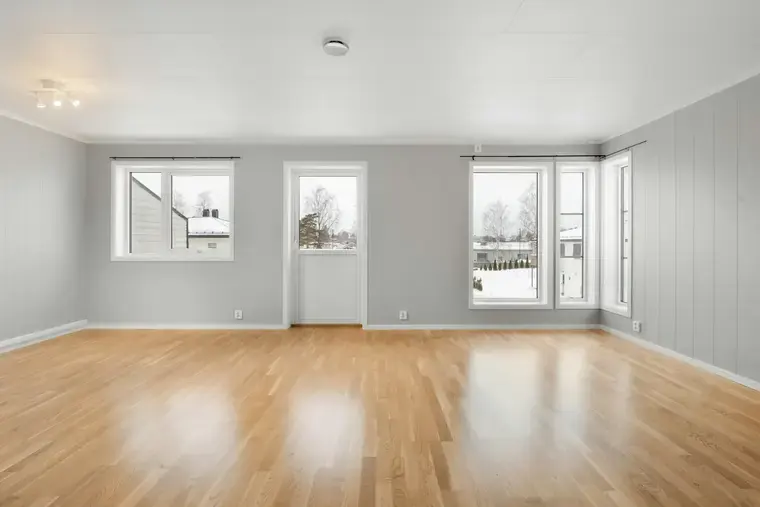
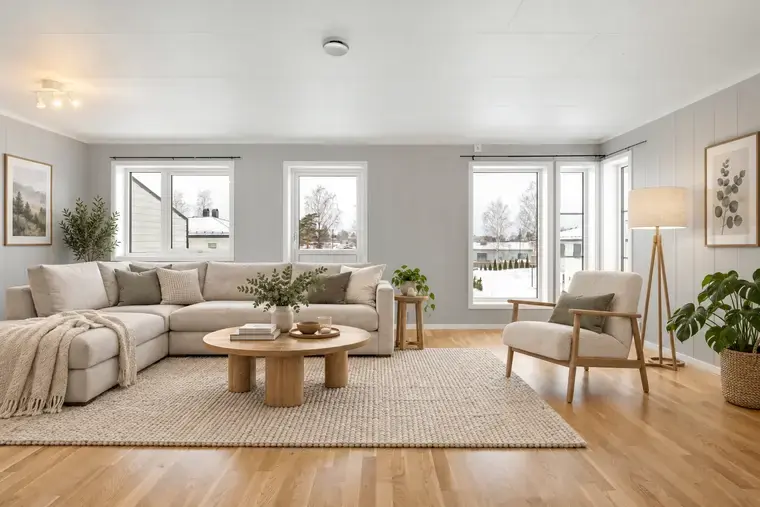
Real StageZap output. Walls, windows, floor and light are unchanged — only furniture and decor were added.
What the AI actually does
The model reads the photo’s geometry — floor plane, wall lines, vanishing points and window light — and paints furniture into that space. StageZap sends every request with a structure lock: walls, windows, doors, flooring, ceiling, built-ins and camera perspective are instructed to stay exactly as photographed, and the output keeps your original aspect ratio. Only movable furniture and decor are added.
That matters because buyers compare listing photos with the real home. A staged image that changes architecture is not just misleading — in many markets it breaks MLS and advertising rules.
Where AI staging works best
- Vacant listings — living rooms, primary bedrooms and dining areas gain the most.
- Awkward rooms — showing a bonus room as an office or nursery answers “what would I use this for?”.
- Pre-construction and renovations — preview finishes and furniture before the room is done (label it clearly).
- Short-term rentals — choose a style before buying furniture; see Airbnb listing photos.
What it should not be used for
Do not use staging to hide damage, cover stains or fake renovations. Keep bathrooms, hallways and garages unstaged; buyers judge those on condition. Always label staged photos and keep the empty original in the gallery — our disclosure guide covers common rules.
Getting realistic results
- Shoot straight on, at chest height, lights on, blinds open — see how to photograph empty rooms.
- Pick the right room type so furniture is scaled correctly.
- Choose one of 8 styles that fits the buyer, not your own taste — how to choose a style.
- Zoom in before publishing: check legs touching the floor, shadows matching windows, and no warped lines.
Styles you can try
Modern, Scandinavian, Luxury, Farmhouse, Industrial, Japandi, Mid-Century Modern and Coastal. Already-furnished room? See AI room staging.
Frequently asked questions
Is AI virtual staging legal for listings?
Yes in general, provided the photos are clearly labeled as virtually staged and do not misrepresent the property. Rules vary by MLS, portal and country, so check yours.
How much does it cost?
StageZap has a free demo (15 images per 10 minutes) and paid plans; current prices are on the pricing page.
How long does one photo take?
Typically 30–90 seconds depending on the model and load.
Can I request specific furniture?
Yes — add a short wish such as “a reading chair by the window” or “navy cushions”.
Related
- AI room staging: see your room in a new style
- Industrial virtual staging for lofts and urban condos
- Japandi virtual staging: calm rooms that photograph big
- Farmhouse virtual staging for family homes
- StageZap vs Virtual Staging AI
Further reading
Virtual staging vs traditional staging How to virtually stage small rooms
 How to virtually stage a listing, step by step
Ready to see your own photo transformed?
Upload one photo. No sign‑up needed for the free demo.
Try it free in the studio